Best Instagram Auto Reply Tools: Features, Pricing, and Setup
Compare Instagram auto reply tools for comments, DMs, and stories. Learn what to verify, how to choose a tool, and how to turn replies into leads.
The best Instagram auto reply tool is the one that can respond to the interactions you actually receive, capture a useful lead when appropriate, and hand complex conversations to a person. Compare comment, story, and DM triggers alongside account authorization, consent, analytics, team workflow, and total cost.
SocialGrow is built for Instagram-first auto-replies, lead capture, and follow-up. Comments appear in its comment inbox; DMs use a separate inbox currently in beta. Story interactions can start supported workflows, but they do not appear in a combined inbox. See the Instagram auto-reply workflow or start a SocialGrow trial.
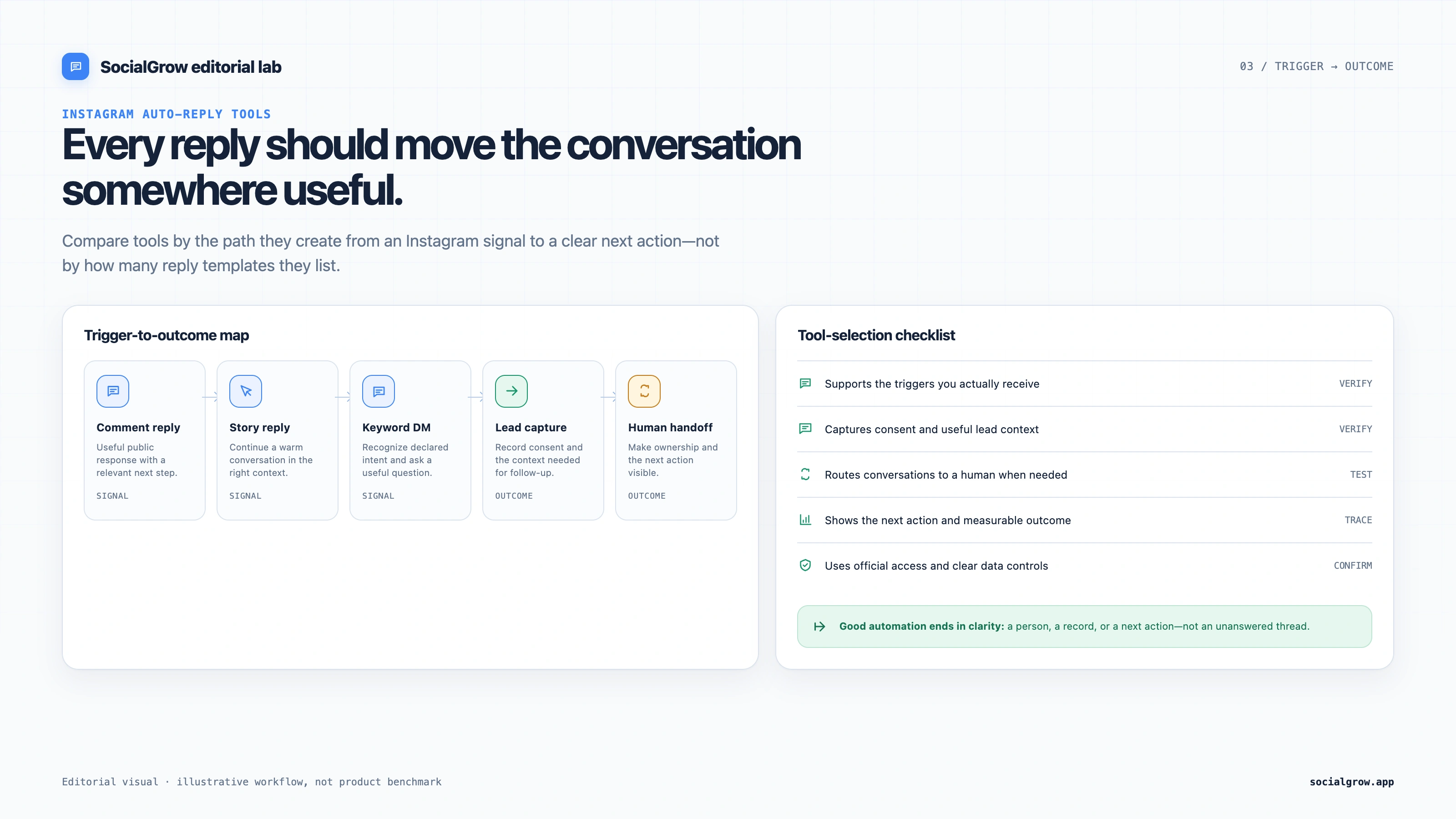
What is an Instagram auto reply tool?
An Instagram auto reply tool responds to a supported comment, DM, or story interaction without requiring someone to copy and paste the same first message every time. A good workflow delivers the promised information, records the source, and stops or hands off when the conversation needs a human.
For platform requirements and permissions, read Meta’s Instagram Messaging API documentation. Do not share an Instagram password with an automation provider.
Which types of Instagram auto reply should you compare?
| Type | What it does | Best use |
|---|---|---|
| Comment-to-DM | Sends a private reply after a relevant comment or keyword | Resource delivery, lead capture, pricing or booking prompts |
| Public comment reply | Posts a response under the comment | Community context and visible answers |
| Story reply | Responds to a story reply or reaction | Nurturing a warm conversation |
| DM keyword reply | Matches a known phrase in an inbound DM | FAQs, lead triage, routing |
| Welcome response | Starts a supported first interaction | Explain what the person can ask for next |
| Follow-up sequence | Sends a relevant reminder after an earlier interaction | Nurture, provided the person can stop the sequence |
Which Instagram auto reply tools are worth comparing?
Competitor plans below were checked on September 28, 2026; SocialGrow’s public prices were checked September 28. Prices are provider-listed US prices where shown; billing country, billing term, and account eligibility can change the final price. Use the linked live pages to confirm the details for your account.
| Tool | Best fit | Current public plan detail | What to check in your workflow |
|---|---|---|---|
| SocialGrow | Instagram comment, DM, and Story workflows that continue into lead capture and follow-up | US$14.99/month or US$149/year; India: ₹499/month or ₹4,990/year. 7-day trial, no card required. Pricing | Test the exact trigger, captured lead fields, separate inbox views, available handoff, analytics, and exports you need. |
| ManyChat | Instagram alongside other messaging channels | Free: 25 Active Contacts/month. Essential: US$17/month or US$14/month billed annually, with 250 included contacts. Pricing · Plan details | Contact overages, channel eligibility, and which features are in your billing-country plan. |
| CreatorFlow | Instagram comment-to-DM and story replies with lead-capture extras | Free: 1 account and 500 DMs/month. Pro: US$15/month or US$12/month billed annually, with 5,000 DMs/workspace/month. Growth: US$30/month or US$24/month billed annually, with 10,000 DMs/workspace/month. Paid plans include a 14-day trial requiring a payment method. Pricing | DMs per workspace, email collection, click tracking, and CSV fields. |
| LinkDM | Link delivery after a post, Reel, story, or comment | Free: 1 account and 1,000 DMs/month. Pro: US$19/month, 3 accounts and 25,000 DMs/month. Pricing | Comment auto-reply and lead-gen features are on Pro; check what its lead record includes. |
| Chatfuel | Sending an Instagram commenter to WhatsApp | Its Instagram comment page currently advertises a free comment-to-WhatsApp flow. | Confirm the account requirements, the exact public reply and WhatsApp step, and any broader product limits. |
ManyChat’s pricing page says final prices depend on billing country and lists additional Active Contact charges above plan allowances. CreatorFlow and LinkDM have message-based limits. These plans are not directly equivalent: compare your expected usage and required workflow, not only the entry price.
For ManyChat’s current terms, check its pricing page and free-plan documentation. For SocialGrow, use the canonical pricing page rather than relying on an old article price. If you are choosing specifically for lead qualification and follow-up, see the Instagram DM lead-generation tools comparison.
Why choose SocialGrow for Instagram auto reply?
SocialGrow’s marketing and help content describe a workflow that connects auto-replies with the next action a lead needs:
- Comment and keyword-triggered messages.
- Story reply workflows.
- Lead capture from the conversation.
- Follow-up sequences with a human handoff.
- A comment inbox and a separate DM inbox (currently in beta); Story interactions run through workflows rather than an inbox view.
- Analytics and CSV export for reviewing lead activity.
The value is not an automated message by itself. The value is connecting a supported reply with lead context and a clear next step. Review the lead-capture page for that workflow.
What should you look for in an Instagram auto reply tool?
1. Supported authorization
Confirm that the provider uses the supported Meta connection for your account. Never use a provider that requests your password or advertises browser automation as “undetectable.”
2. Trigger flexibility
List the events that matter to your business: comment keywords, inbound DM phrases, story replies, or another supported interaction. Test variations deliberately rather than enabling broad matching that can fire on unrelated conversations.
3. Lead capture and consent
Ask how the tool records a conversation, stores a source campaign, captures consent, exports a lead, and handles an opt-out. A tool that can send a reply but cannot preserve lead context may create more manual work later.
4. Human handoff
The workflow should stop when a person replies, asks for help, or opts out. Complex questions and valuable sales conversations should be visible to the team in an inbox.
5. Analytics
Look for trigger matches, delivery status, replies, captured leads, source attribution, and downstream actions. A single “messages sent” number cannot tell you whether the workflow generates useful conversations.
6. Pricing and limits
Check active automation limits, contact or message limits, team seats, integrations, exports, AI usage, annual billing, and trial terms. Compare the cost at your expected interaction volume, not only the headline starter price.
How do you set up Instagram auto reply?
Comment auto reply
- Choose one resource, offer, or answer to deliver.
- Connect your account using the supported authorization flow.
- Create one short keyword such as GUIDE, PRICE, INFO, or BOOK.
- Write a short message that delivers the promised value first.
- Add a relevant qualification question only if your team will use the answer.
- Test delivery, links, duplicate behavior, opt-out, and human handoff with a separate account.
DM auto reply
- Review recent inbound messages for recurring questions.
- Create narrowly scoped rules for those questions.
- Write conversational answers with a clear next step.
- Route unmatched or complex messages to a person.
Story auto reply
- Choose a story interaction that signals real interest.
- Acknowledge the story context instead of sending a generic pitch.
- Offer one useful next step.
- Stop the sequence when the person replies or asks for a human.
For a longer implementation walkthrough, follow the Instagram auto-reply setup guide.
What are the common Instagram auto reply mistakes?
Sending the same message to everyone
Use the context of the interaction and keep campaigns separate. Repeating an irrelevant message makes the automation feel careless.
Automating before validating the offer
Test the resource and CTA manually first. Automation amplifies a clear offer; it does not repair an unclear one.
Over-automating high-value conversations
Use rules for delivery and triage. Let a person handle nuance, negotiation, support issues, and important buying decisions.
Omitting consent and stop conditions
Explain what a person will receive, collect only what you need, and stop follow-up when the person opts out. Check the rules that apply to your audience and message type.
Ignoring the source of the lead
Record which post, story, keyword, or campaign started the interaction. That is how you learn which content produces qualified conversations.
How this comparison was prepared
The shortlist compares workflow fit, public plan details, lead context, and the next step a buyer should verify. Competitor plan details were taken from the linked provider pages checked on September 28, 2026; this is a public-information comparison, not a hands-on benchmark of every tool. Recheck prices and limits before buying. SocialGrow workflow claims should be checked against the current auto-reply page, lead-capture page, and pricing page.
Ready to stop copying the same replies? Create your first Instagram lead-capture workflow or start SocialGrow.
For the wider landscape of Instagram marketing tools, see the Instagram marketing tools guide.
Frequently asked questions
Is Instagram auto reply safe for my account? +
It can be safe when the tool uses the supported Meta authorization and messaging flow. Avoid providers that ask for your Instagram password, use scraping or browser bots, or promise that automation is undetectable.
Can I auto reply to comments without sending a DM? +
Some workflows can publish a public comment reply, while others send a private message. Public replies help with community context; private replies are useful for delivering a resource or starting a qualified lead conversation.
How much does Instagram auto reply cost? +
Costs range from native tools with basic features to paid tools with broader triggers, lead capture, analytics, and follow-up. Check each provider's current pricing, limits, and trial terms before deciding.
What's the difference between auto reply and a chatbot? +
Auto reply uses a rule such as a keyword and a prepared message. A chatbot handles more open-ended conversations. Both should have clear boundaries and an easy human handoff.
Will auto reply help my Instagram engagement? +
It can make it easier to respond consistently and deliver value after a relevant comment or message. It is not a guaranteed engagement lift; the offer, audience, content, and response quality still determine the result.
Related Articles
5 Best Instagram DM Tools for Lead Generation (2026)
Our ranked Instagram DM tools for lead generation, compared by contact capture, qualification, routing, reporting, and plan limits.
automation5 Best Instagram DM Automation Tools in 2026, Ranked
Our ranked Instagram DM automation tools for 2026, compared by lead capture, channel mix, link delivery, plan limits, and workflow fit.
automationHow to Set Up Instagram Auto Reply
Set up Instagram auto replies for comments, DMs, and supported Story interactions. Test the trigger, message, handoff, and permissions.
Ready to automate your Instagram engagement?
Turn high-intent Instagram comments into useful DM follow-ups with SocialGrow.
Start Free Trial7-day free trial · No credit card required