Instagram DM Automation: Setup and Safety Guide
Learn how Instagram DM automation works, which workflows to automate, how to capture leads, and how to keep human handoff and account safety in the process.
Instagram DM automation is software that responds to a supported trigger—such as a comment keyword, story reply, or incoming message—with a prepared next step. The safest and most useful setup automates delivery and triage, then gives a person the context needed to answer nuanced questions and close a good-fit conversation.
SocialGrow is designed for Instagram workflows that connect supported auto-replies with lead capture, follow-up, and workflow reporting. Comments appear in the comment inbox; DMs use a separate inbox currently in beta. Story interactions can trigger supported workflows, but they are not shown in a combined inbox. See the Instagram lead-capture workflow or start a SocialGrow trial.
For practical copy, use these Instagram auto-reply message examples and adapt the wording to the trigger, offer, and human handoff you actually support.
How does Instagram DM automation work?
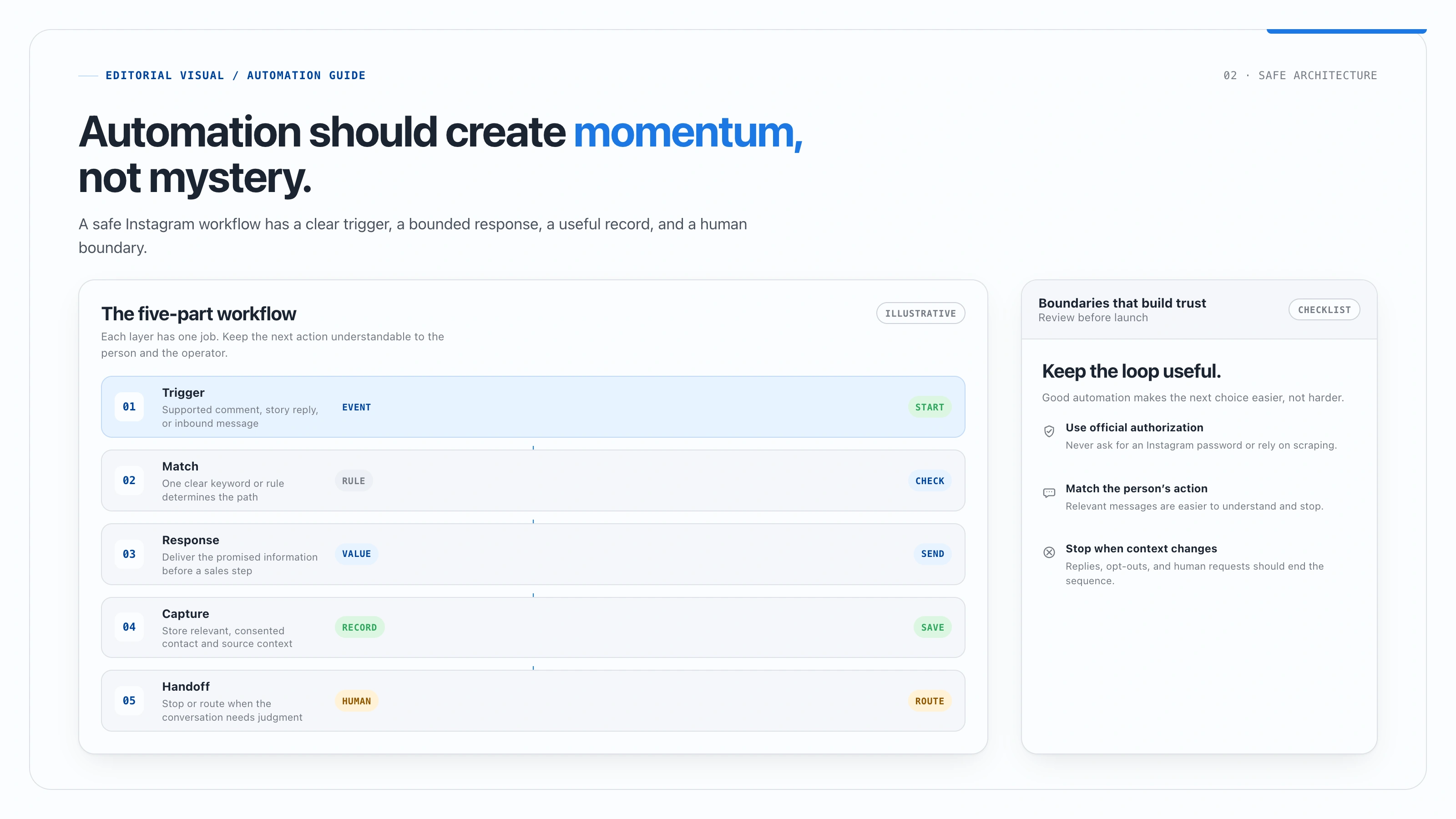
The workflow has five parts:
- A person creates a qualifying event, such as a comment keyword or inbound message.
- The platform matches that event to an automation.
- The automation sends the promised information or asks one relevant question.
- The conversation is recorded with its source and next step.
- A person takes over when the conversation is complex, valuable, or outside the rule.
Use an official connection and check the current Meta Instagram Messaging API documentation for supported permissions and messaging behavior.
Which Instagram DM workflows should you automate?
| Workflow | Trigger | Useful next step |
|---|---|---|
| Comment-to-DM | A keyword comment on a post or Reel | Deliver a guide, product detail, or booking link |
| Story reply | A reply or reaction to a story | Acknowledge the context and invite a relevant reply |
| Keyword auto-reply | An inbound message containing a known phrase | Answer a common question or route the conversation |
| Welcome response | A supported first interaction | Explain what the person can ask for next |
| Follow-up sequence | A person requested information but has not completed the next step | Send a useful reminder and provide a stop or human option |
Do not add a workflow just because the tool supports it. Start with the repetitive question or lead path that already costs your team time.
How do you set up your first Instagram DM automation?
Step 1: Choose one business outcome
Decide whether the workflow delivers a resource, qualifies a lead, answers a common question, or starts a booking conversation. One workflow should have one primary outcome.
Step 2: Connect the account through the supported authorization flow
Use OAuth or the platform’s official authorization flow. You should never need to give an automation provider your Instagram password. Confirm the account type and linked assets required for your setup.
Step 3: Choose a clear trigger
Use a short keyword such as GUIDE, PRICE, MENU, or BOOK. Match the keyword to the offer, avoid collisions with other campaigns, and test spelling variations only if the platform supports them reliably.
Step 4: Write the first message
Deliver the promised value before requesting additional information:
Thanks for commenting GUIDE. Here is the checklist: {{your_link}}. If you want help applying it, reply with your biggest question and I will point you to the next step.
Do not make an automated message sound like a person pretending to be present. Clear automation is more trustworthy than a fake personal note.
Step 5: Add a qualification question only when needed
Ask one question that changes the next action. A coach might ask what outcome the person is working toward. A local service business might ask which service or location they need. Avoid collecting information that your team will not use.
Step 6: Configure handoff and stop conditions
Stop the sequence when the person replies, asks for a human, or opts out. Route complex questions to the inbox and give the team a clear source, trigger, and prior message.
Step 7: Test before publishing
Use a separate account to test the trigger, delivery, link, formatting, consent language, handoff, duplicate prevention, and opt-out behavior. Update the workflow when the platform or product changes.
How does comment-to-DM automation generate leads?
The practical path is:
- A post offers one useful resource.
- The caption invites a relevant keyword.
- The automation delivers the resource.
- The person replies or shares a consented contact detail.
- The lead record stores the source campaign and conversation context.
- The team follows up with a call, application, purchase, or other appropriate next step.
Read the detailed comment-to-DM lead generation guide for offer ideas and measurement.
What should stay human?
Keep a person involved in:
- Sensitive questions.
- Pricing exceptions or negotiations.
- Complex product or service decisions.
- High-value sales conversations.
- Complaints and support issues.
- Any conversation where the trigger does not explain intent.
Automation is a response system, not a substitute for judgment. A useful handoff is a conversion feature because it prevents the prospect from repeating their context.
How should you measure Instagram DM automation?
Track the funnel rather than a single reply count:
| Metric | Question it answers |
|---|---|
| Trigger matches | Did the content and keyword attract the intended action? |
| DM delivery | Did the promised message reach the person? |
| Replies | Did the message start a real conversation? |
| Lead capture | Did the person provide consented contact information? |
| Qualification | Does the lead fit the offer? |
| Next-step action | Did they book, apply, purchase, or start a trial? |
| Opt-outs and failures | Is the workflow too frequent, unclear, or poorly targeted? |
Compare results by content, keyword, audience, and offer. Do not publish a “healthy benchmark” unless you have a defined sample, date range, audience, and method.
How do you keep Instagram automation safe?
Do
- Use the supported Meta authorization and messaging flow.
- Send a message that matches the person’s action.
- Deliver the promised value before adding a sales step.
- Keep a human handoff available.
- Store consent and opt-out signals where your workflow requires them.
- Monitor delivery failures, replies, and complaints.
Do not
- Share an Instagram password with a third-party tool.
- Use scraping, browser automation, or “undetectable” bot claims.
- Send unsolicited cold messages at scale.
- Continue a sequence after a person asks you to stop.
- Claim that any tool makes an account risk-free.
Review Meta’s current Instagram Messaging API documentation and your applicable privacy and marketing rules before collecting email addresses or phone numbers.
How does SocialGrow support the workflow?
SocialGrow’s current product pages describe supported keyword, comment, incoming-DM, and Story workflows, lead capture, follow-up, workflow reporting, and CSV export. Comments and DMs have separate inbox views; the DM inbox is currently in beta, and Story interactions are not shown in a combined inbox. Confirm the exact features and limits available to your workspace on the Instagram auto-reply page and pricing page.
How this guide was prepared
This guide distinguishes platform guidance from product messaging and avoids universal send limits or guaranteed outcomes. The templates are illustrative examples; they are not customer results. Test each automation with your own account, document the outcome, and update the workflow when Meta changes its permissions or policies.
For a broader comparison, read 16 ManyChat alternatives for Instagram and Instagram auto-reply tools.
Ready to turn Instagram conversations into organized follow-up? Create your first lead-capture workflow or start SocialGrow.
Frequently asked questions
Is Instagram DM automation allowed? +
It can be used when the workflow follows Meta's supported messaging products, permissions, and policies. Avoid scraping, browser bots, password collection, and unsolicited outreach. Check Meta's current Instagram Messaging API documentation before activating a workflow.
Can DM automation get my account banned? +
No provider can promise zero risk. Use an official authorization flow, send relevant messages to people who initiated or qualified the interaction, respect platform rules, and stop automation when a person asks for a human or opts out.
How many automated DMs can I send per day? +
Instagram does not provide one universal public limit that applies to every account and workflow. Follow the limits and permissions shown for your account and provider rather than using a generic sending number.
What is the difference between DM automation and a chatbot? +
Rule-based automation sends a known response when a trigger matches. A chatbot generates or selects responses for more open-ended conversations. Both need clear boundaries and human escalation.
Can I automate Instagram DMs for free? +
Native Instagram and Meta tools may cover basic responses, while dedicated tools offer broader workflows. Compare the current feature limits, trial terms, and total cost before choosing a free option.
Related Articles
Instagram Auto DM for Small Business
Learn how small businesses use Instagram auto DMs to answer questions, deliver links, capture consented leads, and follow up without losing the human touch.
automation5 Best Instagram DM Tools for Coaches (2026)
Our ranked Instagram DM tool picks for coaches, compared by lead magnet delivery, contact capture, follow-up, channel mix, and plan limits.
automationInstagram Auto-Reply Message Examples for Creators and Small Businesses
Copy-and-edit Instagram auto-reply messages for comments, DMs, prices, bookings, and FAQs for creators and small businesses.
Ready to automate your Instagram engagement?
Turn high-intent Instagram comments into useful DM follow-ups with SocialGrow.
Start Free Trial7-day free trial · No credit card required